Proxy socket.io and nginx on the same port, over SSL
Summary
My current project has a realtime part, using socket.io on nodejs, and a web part using django on nginx / gunicorn. Here’s a setup to put them both on the same port, and make them both go over SSL. I’m assuming you’re on Ubuntu.
Disclaimer: I got this working last night, so no promises. You’ll certainly want to tweak haproxy’s config for performance. I also only tested it with socket.io’s web socket transport.
Overview
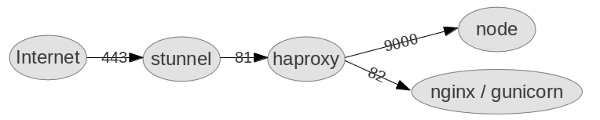
- stunnel decrypts the ssl, so everything after that doesn’t know about it. It decrypts both web traffic (HTTPS to HTTP), and web socket traffic (WSS to WS).
- haproxy sends web socket traffic to node and web traffic to nginx.
- node runs socket.io, handling the web socket traffic.
- nginx serves static content.
- gunicorn runs python / django, and there’s a database out back somewhere, but that’s not relevant here.
Currently nginx doesn’t
support HTTP/1.1 for it’s backends, so it can’t proxy web socket traffic. That’s why we have haproxy.
But haproxy doesn’t do SSL, that’s why we have stunnel. And haproxy isn’t a web server, so we still need nginx.
Generate a self-signed cert
To test this you’ll need an SSL certificate. Here’s how (thanks Victor Farazdagi):
openssl genrsa -out mysite.key 1024
openssl req -new -key mysite.key -out mysite.csr  # common name == your domain
openssl x509 -req -days 365 -in mysite.csr -signkey mysite.key -out mysite.crt
stunnel
Install: sudo apt-get install stunnel4.
Enable it by editing /etc/default/stunnel and settings ENABLED=1.
Config: /etc/stunnel/stunnel.conf
cert = /etc/stunnel/localhost.crt
key = /etc/stunnel/localhost.key

debug = 5
output = /var/log/stunnel4/stunnel.log

[https]
accept = 443
connect = 81
TIMEOUTclose = 0
haproxy
Install: sudo apt-get install haproxy
Config: /etc/haproxy/haproxy.cfg
global
    maxconn 4096
    daemon

defaults
    mode http
    log 127.0.0.1 local1 debug
    option httplog

frontend all 0.0.0.0:81
    timeout client 86400000
    default_backend www_backend
    acl is_websocket hdr(Upgrade) -i WebSocket
    acl is_websocket path_beg /socket.io/

    use_backend socket_backend if is_websocket

backend www_backend
    balance roundrobin
    option forwardfor # This sets X-Forwarded-For
    option httpclose
    timeout server 30000
    timeout connect 4000
    server server1 localhost:82 weight 1 maxconn 1024 check

backend socket_backend
    balance roundrobin
    option forwardfor # This sets X-Forwarded-For
    option httpclose
    timeout queue 5000
    timeout server 86400000
    timeout connect 86400000
    server server1 localhost:9000 weight 1 maxconn 1024 check
haproxy logs to syslog, and expects it to be in server mode, so you need to set that up too (thanks Kevin van Zonneveld):
rsyslog config: /etc/rsyslog.d/haproxy.conf
$ModLoad imudp
$UDPServerRun 514
$UDPServerAddress 127.0.0.1

local1.* -/var/log/haproxy_1.log
& ~
Then bounce rsyslog: sudo restart rsyslog
nginx
First bounce http traffic to https: /etc/nginx/sites-enabled/default
server {
  listen 80;
  server_name _; # Catch requests that don't match any other server name
  rewrite ^ https://myapp.example.com$request_uri? permanent;
}
Next setup nginx on port 82, and make sure to rewrite Location responses (see THIS ONE below):
server {
  listen 82;
  server_name myapp.example.com;

  location /static {
    root /var/www/myapp.example.com;
  }

  location / {
    proxy_pass http://unix:/tmp/ginger-gunicorn.sock;
    ## THIS ONE ##
    proxy_redirect http://myapp.example.com https://myapp.example.com;
    ## END THIS ONE ##
    proxy_set_header Host $host;
    proxy_set_header X-Real-IP $remote_addr;
    proxy_set_header X-Forwarded-For $proxy_add_x_forwarded_for;
  }
}
Node
Put node on port 9000, with a standard config. Make sure to ask the client library to connect securely, so that it stays on port 443 (https then wss):
var socket = io.connect('https://myapp.example.com', {secure: true})
Good luck
This setup is working for me, so far. There’s quite a few moving parts. HTTP/1.1 is coming to nginx (it’s in the dev version already), so hopefully we’ll be able to use that instead of haproxy and stunnel soon.